
Ever wondered why some articles rank effortlessly while others with the same keyword count get buried on page two? The answer usually comes down to how naturally a keyword density checker guides your keyword usage, not how many times a word appears on the page.
If you write content regularly, you’ve likely asked yourself this exact question: is my keyword usage helping or hurting my rankings? Use too few mentions and search engines may struggle to understand your topic. Overdo it, and you risk sounding robotic while triggering over-optimization flags, a concern that echoes broader worries about AI tools replacing human judgment in everyday work. Finding that balance is exactly what a keyword density checker helps you do, and picking the right one makes all the difference.
This guide answers the question directly, walks through seven trusted tools, explains how the metric works, and shows you how to use it without ruining your writing.
What Is Keyword Density and Why Does It Matter?
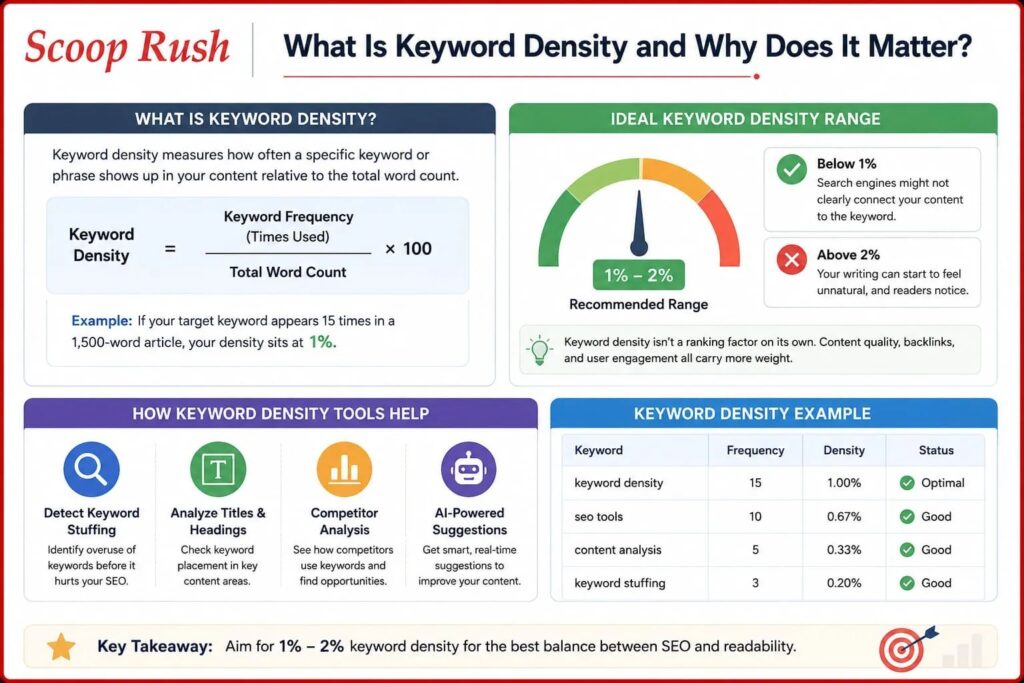
Keyword density measures how often a specific keyword or phrase shows up in your content relative to the total word count. The formula is simple:
Keyword Density = (Keyword Frequency ÷ Total Word Count) × 100
So if your target keyword appears 15 times in a 1,500-word article, your density sits at 1%. Most SEO professionals suggest keeping that number between 1% and 2%. Below that range, search engines might not clearly connect your content to the keyword. Above it, your writing can start to feel unnatural, and readers notice.
It’s worth remembering that keyword density isn’t a ranking factor on its own. Content quality, backlinks, and user engagement all carry more weight. However, density remains a useful diagnostic tool for spotting imbalances before you hit publish, much like how Google’s own traffic patterns are shifting as search behavior evolves.
How These Tools Actually Help
A good density checker does more than spit out a percentage. It can flag keyword stuffing before it becomes a problem, highlight where your terms appear in titles and headings, and even let you analyze a competitor’s page to see how they’ve balanced their own keyword usage. Some tools now use AI to suggest fixes on the spot, which speeds up the editing process considerably, similar to how newer models like Kimi K3 from Moonshot AI are built to handle nuanced content tasks faster than earlier systems.
7 Best Keyword Density Checkers for Content Optimization
1. AIOSEO (All in One SEO)
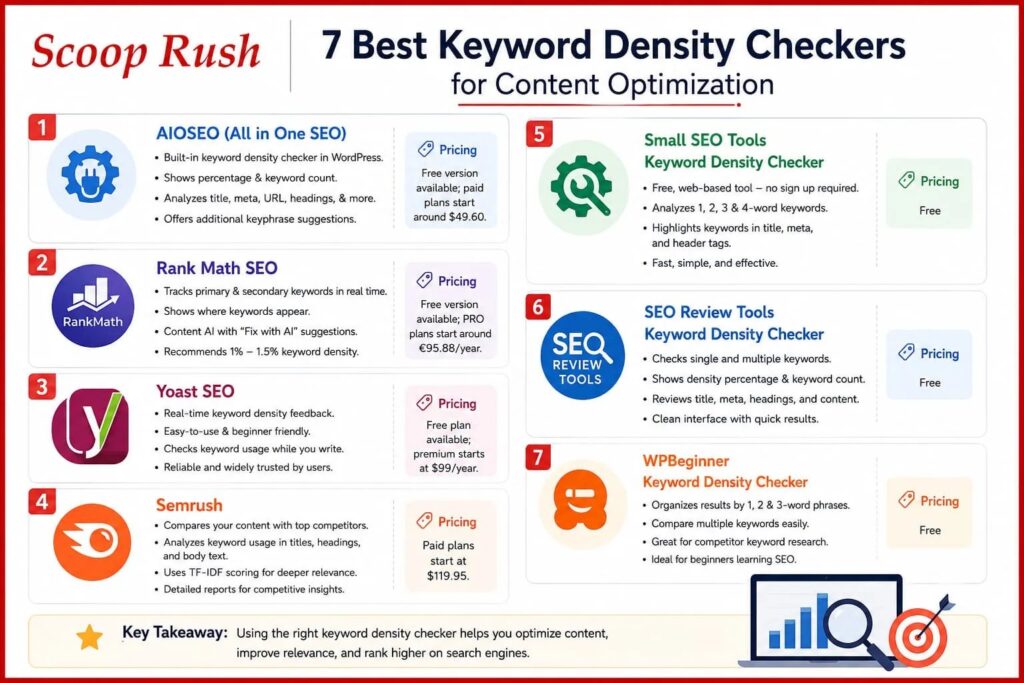
AIOSEO is a WordPress plugin used by millions of site owners, and it builds keyword density checking directly into the editor. You enter your focus keyword under the Focus Keyphrase section, and the plugin scans your title, meta description, URL, first paragraph, subheadings, and image alt text for that term.
What makes it useful is that it shows both a percentage and the raw number of times your keyword appears, so you know exactly what to add or trim. It also offers additional keyphrase suggestions when connected to Semrush, which helps you diversify your wording and avoid repetition.
Pricing: Free version available; paid plans start around $49.60.
2. Rank Math SEO
Rank Math is another WordPress plugin, and it’s built around real-time feedback. As you write, it tracks both primary and secondary keywords and shows you exactly where they appear, whether that’s your title, meta description, or opening paragraph.
Its standout feature is Content AI, which includes a “Fix with AI” button that generates suggestions to resolve density issues without making your writing sound stiff. The plugin generally recommends staying between 1% and 1.5% density for the best results.
Pricing: Free version available; PRO plans start around €95.88 per year, with Content AI available as an add-on.
3. Yoast SEO
Yoast is one of the most widely used SEO plugins for WordPress, and its keyword density checker works in real time inside the editor. As you type, it gives immediate feedback on how well you’re using your focus keyword, without needing to switch to a separate tool or browser tab.
The feature set is fairly basic compared to newer AI-driven options, but that simplicity is part of the appeal. It’s dependable and easy to understand, even for writers who are new to SEO.
Pricing: Free plan available; premium starts at $99 per year.
4. Semrush
Semrush takes a more competitive angle on keyword density. Its On Page SEO Checker analyzes your content against top-ranking competitors, showing how often they use your target keyword in their titles, headings, and body text.
The tool also applies Term Frequency-Inverse Document Frequency (TF-IDF) scoring, which measures how important a keyword is to the overall topic of a page compared to your competitors. This gives you a deeper sense of relevance rather than just a raw count. That said, the reports can feel overwhelming if you’re just getting started with SEO.
Pricing: Paid plans start at $119.95.
5. Small SEO Tools Keyword Density Checker
Small SEO Tools is a free, web-based option that requires no account or installation. You simply paste your content or enter a URL, and it returns frequency reports for single keywords as well as two-word, three-word, and even four-word phrases.
It also highlights when your keyword appears in important spots like the title, meta description, or header tags, which is handy for a quick pre-publish check. The interface is clean, and the results come back fast.
Pricing: Free.
6. SEO Review Tools Keyword Density Checker
SEO Review Tools offers one of the more thorough free checkers available. Beyond basic percentages, it breaks down keyword frequency, phrase density, and term distribution across your content, and it filters out stop words like “the” and “and” so you get a cleaner picture of meaningful keyword usage.
You can also use the platform to research related keywords, check search volume, or find featured snippet opportunities, all without leaving the tool. A Chrome extension is available too, which cuts down on tab-switching.
Pricing: Free.
7. WPBeginner Keyword Density Checker
WPBeginner offers a simple, standalone tool that organizes results into lists based on keyword length. Paste in your text or a URL, and it separates out one-word, two-word, and three-word phrases so you can quickly spot your target keyword and see how it stacks up against everything else.
It’s also useful for competitor research since you can run a rival’s URL through the tool to see which terms they’re focused on. This makes it a solid pick for beginners who are still learning how keyword density fits into their overall SEO strategy.
Pricing: Free.
Comparison at a Glance
| Tool | Best For | Key Strength | Pricing |
| AIOSEO | WordPress users | Full on-page keyword checks | Free / from $49.60 |
| Rank Math SEO | WordPress users | AI-powered fix suggestions | Free / from €95.88/yr |
| Yoast SEO | WordPress beginners | Real-time editor feedback | Free / $99/yr |
| Semrush | Competitor analysis | TF-IDF relevance scoring | From $119.95 |
| Small SEO Tools | Quick checks | Fast, multi-word phrase breakdown | Free |
| SEO Review Tools | Detailed audits | Stop word filtering, extra SEO tools | Free |
| WPBeginner | Beginners | Simple, organized phrase lists | Free |
How to Use a Keyword Density Checker the Right Way
Having a good tool is only half the job. The way you apply the results is what actually improves your content.
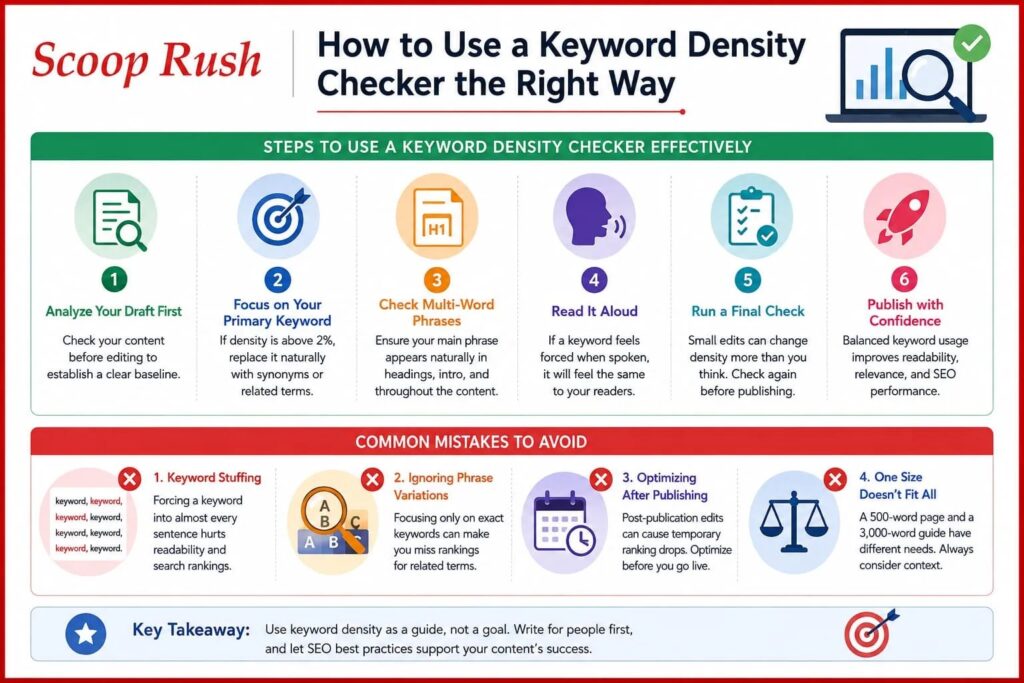
Start by analyzing your draft before making any edits. This gives you a baseline instead of guessing where problems might be. Next, focus on your primary keyword first. If it’s noticeably above 2%, look for natural spots where a synonym or related phrase could replace it.
Don’t stop at single keywords, either. Most content targets multi-word phrases, so check that your primary phrase shows up naturally in your headings, intro, and body text. Once you’ve made adjustments, read the piece aloud. If a keyword feels forced when spoken, readers will likely feel the same way. Finally, run one more check before you hit publish, since small edits can shift your density percentages more than you’d expect, a discipline that matters just as much as the accuracy concerns raised around AI chat tools getting unexpectedly exposed in Google search results.
Common Mistakes That Hurt Your Content
A few habits tend to cause more harm than good. Keyword stuffing, where a term is forced into nearly every sentence, damages both readability and rankings. Similarly, ignoring phrase variations and focusing only on an exact-match keyword can cause you to miss valuable ranking opportunities tied to related terms.
Another mistake is optimizing after a piece has already gone live. Keyword analysis works best before publishing, since post-publication edits can cause temporary ranking swings. And it’s worth remembering that density guidelines shouldn’t be applied the same way to every piece. A 500-word product page has different optimization needs than a 3,000-word guide, so context matters as much as the numbers themselves, the same way a mom scaling a $10K-a-month Etsy side hustle had to adapt her strategy as her business grew.
Final Thoughts
Keyword density isn’t about chasing a perfect percentage. It’s a diagnostic tool that helps you write content that feels natural while still signaling relevance to search engines. The tools above range from simple, no-cost checkers to full plugins with AI-driven suggestions, so there’s an option here whether you’re just starting out or managing multiple sites.
Ultimately, the best approach combines these tools with genuinely useful, well-written content. Focus on your reader first, then let a density checker fine-tune the details before you publish.
FAQs
Which keyword density checker should I use for SEO?
It depends on your setup. WordPress users generally do best with AIOSEO, Rank Math, or Yoast, since these work inside the editor in real time. If you want a quick, no-install option, Small SEO Tools or WPBeginner are solid free picks.
What is the ideal keyword density for SEO?
Most experts recommend staying between 1% and 2%, though some tools suggest a narrower 1% to 1.5% range. There’s no exact number that guarantees rankings.
Can keyword density actually improve my search rankings?
Not directly. It helps search engines understand your content’s relevance, but rankings also depend on quality, backlinks, and user engagement.
Are free keyword density checkers reliable enough to use?
Yes, tools like Small SEO Tools, SEO Review Tools, and WPBeginner provide accurate frequency analysis and are suitable for most everyday content optimization needs.
How often should I check keyword density?
Check it before publishing and again during periodic content updates. Small edits can shift your density more than expected, so a final check before going live is worth the extra minute.

